

#TRON memecoin season is in FULL SWING
The next few weeks will print a couple of 100Xs
We'll also see some bluechips breaking into the mainstream
But by then, you'll already be too late
Here's my ultimate Tron memecoins guide to get in early🧵
The next few weeks will print a couple of 100Xs
We'll also see some bluechips breaking into the mainstream
But by then, you'll already be too late
Here's my ultimate Tron memecoins guide to get in early🧵
Those who caught the SOL & BASE rotations earlier this year made massive profits.
Now, we're seeing another rotation to TRON—luckily, we're still in the early stages.
In this guide, I have compiled everything you need to get started on TRON memecoin hunting.
Now, we're seeing another rotation to TRON—luckily, we're still in the early stages.
In this guide, I have compiled everything you need to get started on TRON memecoin hunting.
1️⃣ Setting up Tron Wallet
The first thing you'll need is a Tron wallet.
I recommend using only official Twitter links for this to avoid scams.
⎆ Head on to @TronLinkWallet and choose from APK, iOS or Google.
⎆ Once installed, click on the TronLink icon & setup your wallet.
The first thing you'll need is a Tron wallet.
I recommend using only official Twitter links for this to avoid scams.
⎆ Head on to @TronLinkWallet and choose from APK, iOS or Google.
⎆ Once installed, click on the TronLink icon & setup your wallet.
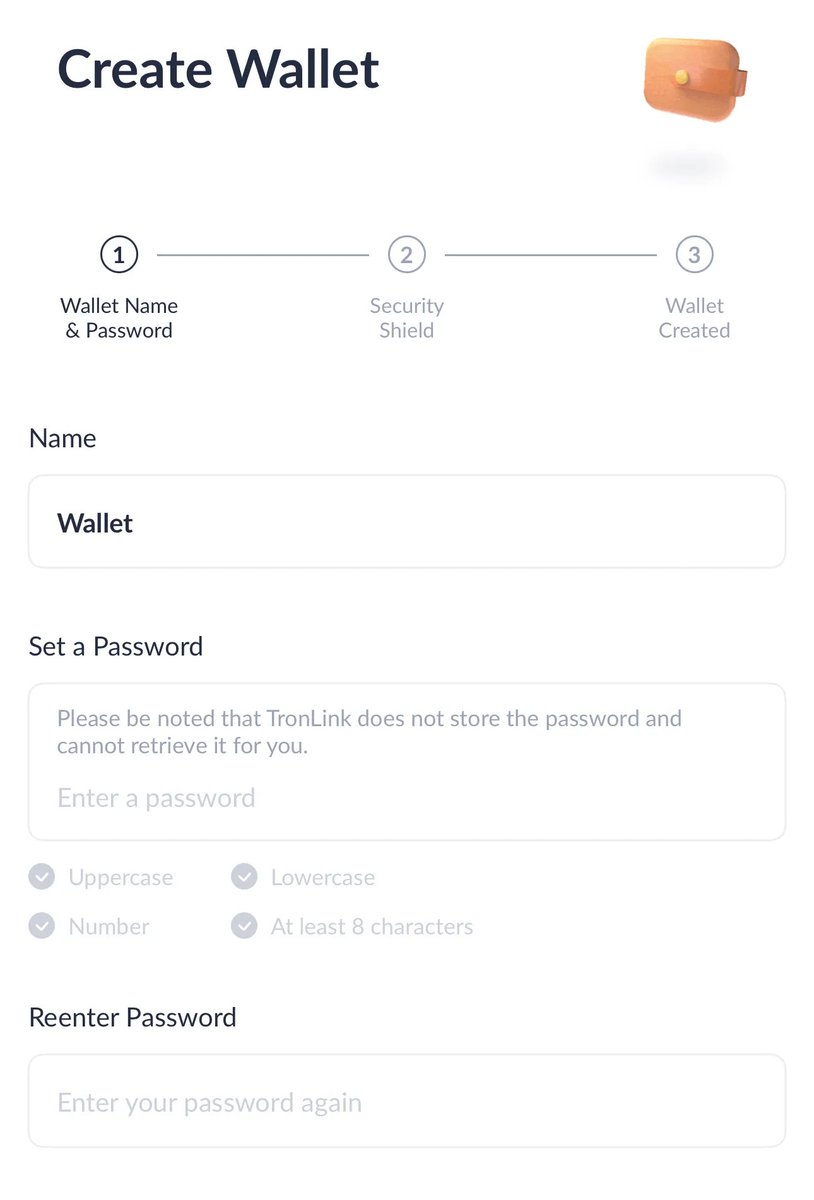
2️⃣ Funding your wallet
Before you can start trading, you need to add funds to your wallet.
⎆ Go to simpleswap.io and swap from other coins, eg: SOL.
⎆ You can also buy $TRX from an exchange & then transfer.
Before you can start trading, you need to add funds to your wallet.
⎆ Go to simpleswap.io and swap from other coins, eg: SOL.
⎆ You can also buy $TRX from an exchange & then transfer.
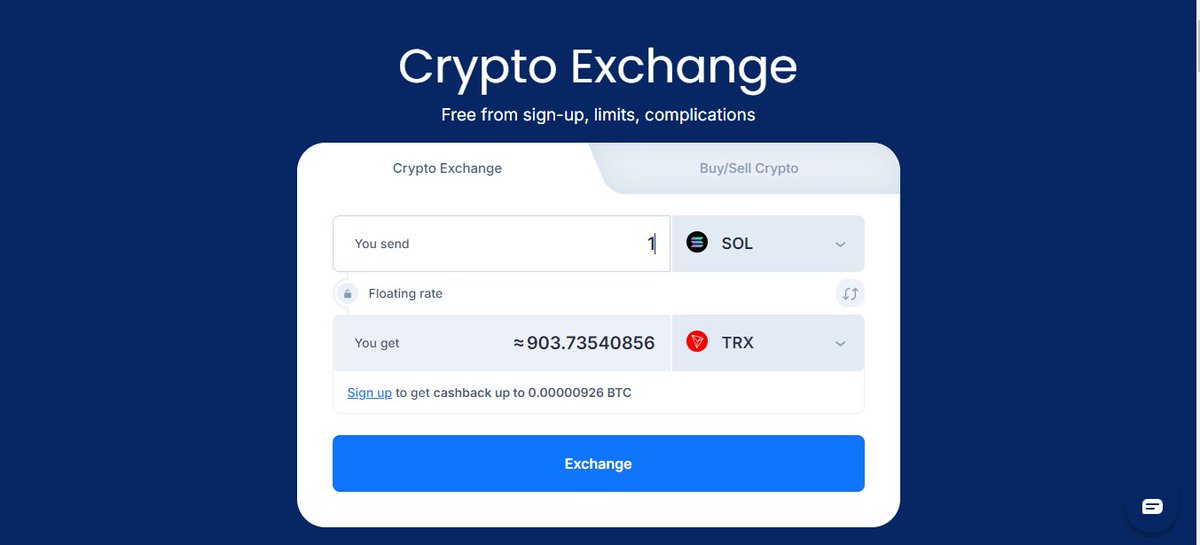

3️⃣ Ultimate Tron Degen Toolkit:
⎆ sunpump.meme: Like pump.fun but for Tron. Catch all the new launches.
⎆ dexscreener.com & dextools.io: Track meme coin prices and trends
⎆ sunswap.com: Primary Tron DEX
⎆ sunpump.meme: Like pump.fun but for Tron. Catch all the new launches.
⎆ dexscreener.com & dextools.io: Track meme coin prices and trends
⎆ sunswap.com: Primary Tron DEX
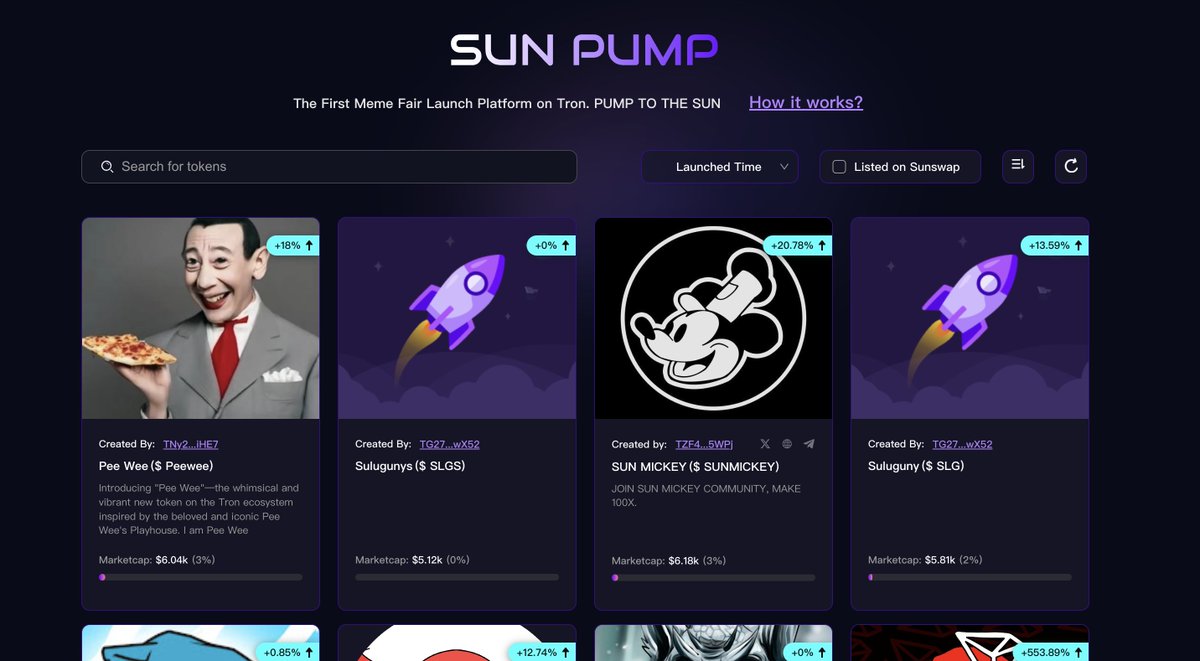
pump.fun
Pump
Launch a coin that is instantly tradable without having to seed liquidity.

sunswap.com
SunSwap
SunSwap is a TRON-based decentralized trading protocol for automated liquidity provision and an open...
dextools.io/app/en/tron/pa…
DEXTools
DEXTools, the gateway to DEFI, real-time charts, history and all token info from blockchain.

sunpump.meme
Sun Pump
The First Meme Fair Launch Platform on Tron:swap,earn,meme culture,instantly tradable without having...

dexscreener.com/tron
Tron DEX Screener
Realtime Tron price charts and trading history
⎆ changenow.io & avedex.cc: Bridging tools
⎆ NFD Tron: t.me | SafeSun Trading Bot: t.me: Top Tron Bots to snipe
⎆ t.me: Smart contract scanner for Tron memes.
⎆ tronscan.org: Tron's blockchain explorer.
⎆ NFD Tron: t.me | SafeSun Trading Bot: t.me: Top Tron Bots to snipe
⎆ t.me: Smart contract scanner for Tron memes.
⎆ tronscan.org: Tron's blockchain explorer.
4️⃣ Trading Memes (Manual)
Before trading, ensure you follow @justinsuntron - his tweeted memes are blowing up.
⎆ Go to: sunpump.meme
⎆ Choose a memecoin you like
⎆ Connect your wallet to SunPump
⎆ Enter the amount of $TRX you want & confirm the txn.
Before trading, ensure you follow @justinsuntron - his tweeted memes are blowing up.
⎆ Go to: sunpump.meme
⎆ Choose a memecoin you like
⎆ Connect your wallet to SunPump
⎆ Enter the amount of $TRX you want & confirm the txn.
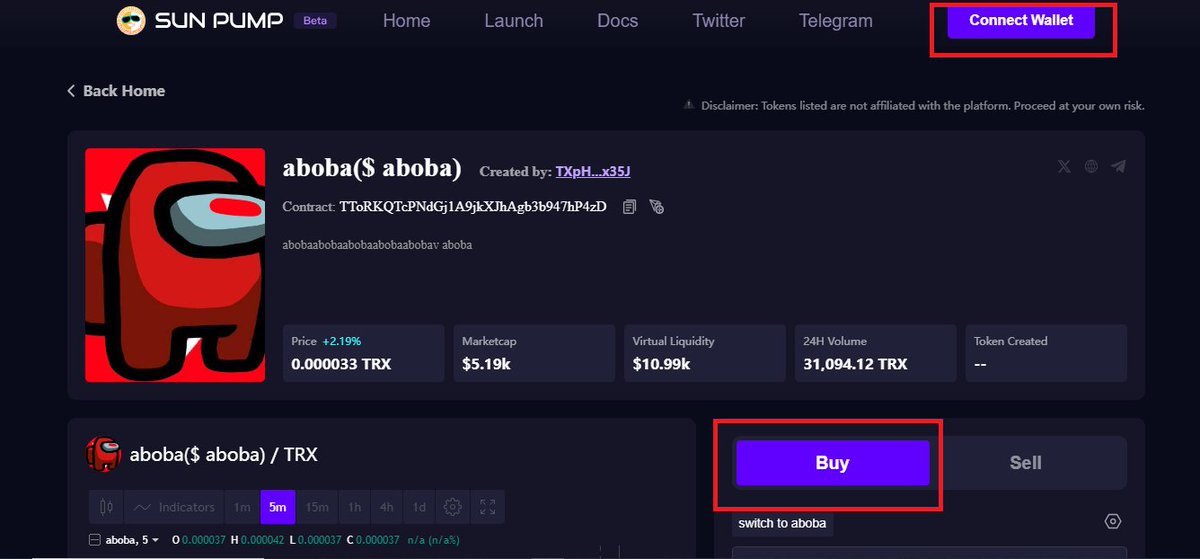

Most memes on SunPump are obviously ultra-degen plays and some traders can't afford that risk.
If you're that trader, trade bigger memecoins on SunSwap.
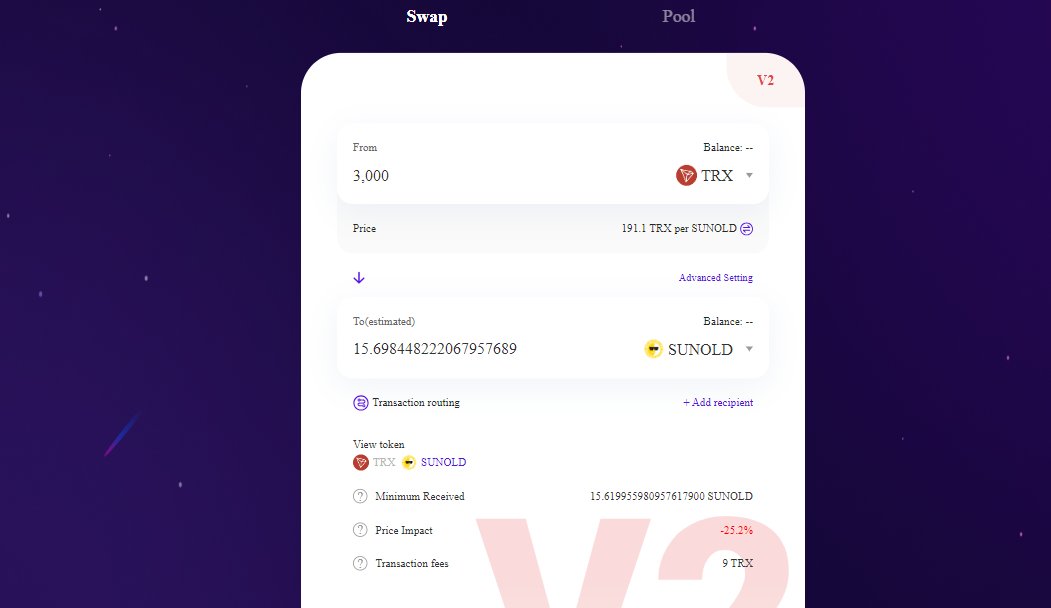
⎆ Go to: sunswap.com
⎆ Select the token
⎆ Enter amount of TRX you want to swap & confirm the txn
If you're that trader, trade bigger memecoins on SunSwap.
⎆ Go to: sunswap.com
⎆ Select the token
⎆ Enter amount of TRX you want to swap & confirm the txn

5️⃣ Sniping Tron memes
Step 1: Ensure the token is safe:
⎆ Find a good memecoin on Dexscreener /DEXtools
⎆ Copy the address & paste it on t.me for a detailed review.
Step 1: Ensure the token is safe:
⎆ Find a good memecoin on Dexscreener /DEXtools
⎆ Copy the address & paste it on t.me for a detailed review.
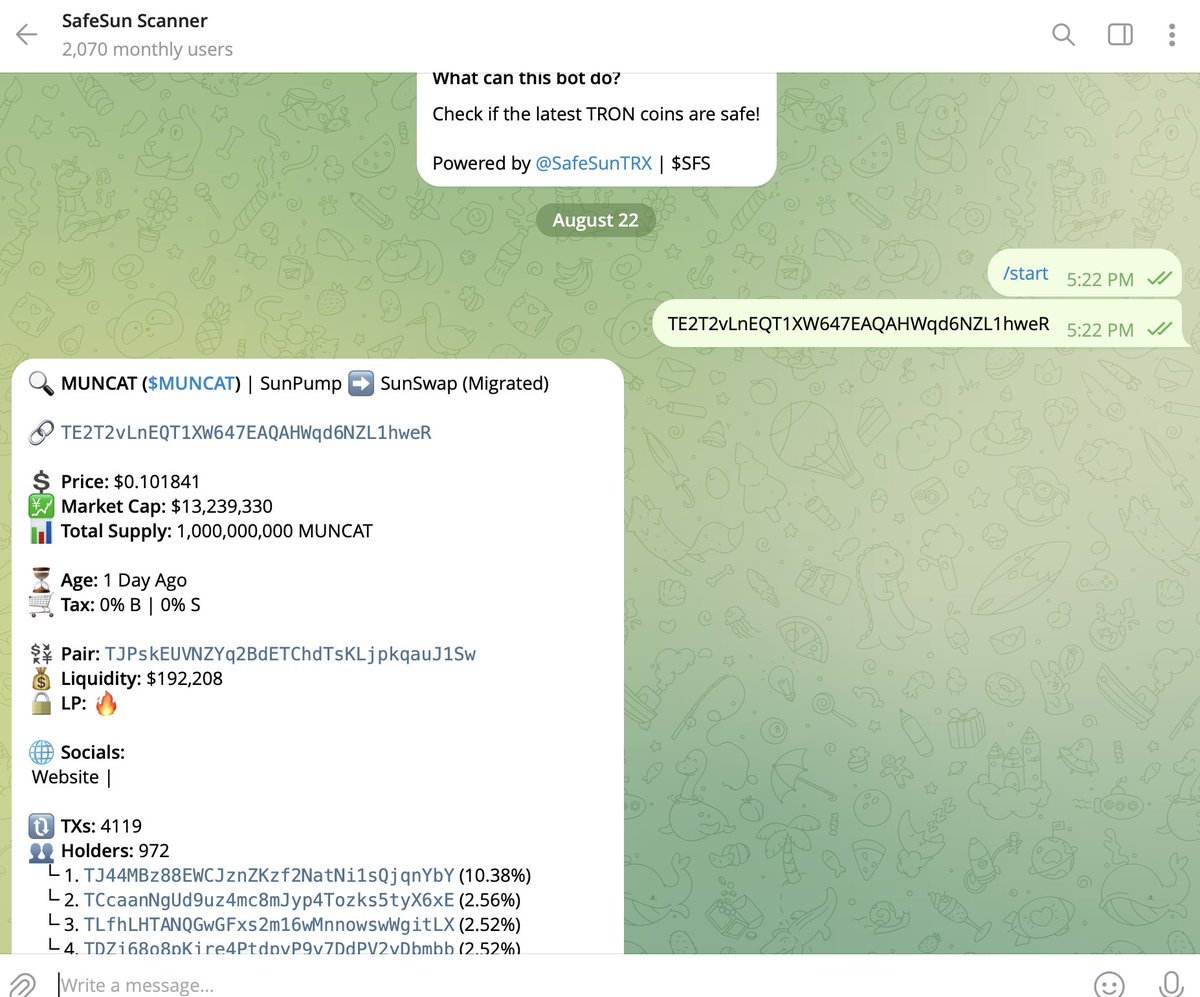

SafeSun Scanner will give you detailed information about the token, such as:
• Market Cap
• Liquidity
• Token Age
• Holder Distribution
• Buy/Sell Tax Rates
• Liquidity Pool (LP) Status (e.g., whether it’s burned)
Everything you need to know before proceeding to buy.
• Market Cap
• Liquidity
• Token Age
• Holder Distribution
• Buy/Sell Tax Rates
• Liquidity Pool (LP) Status (e.g., whether it’s burned)
Everything you need to know before proceeding to buy.
Step 2: BUY
First, you need to set up & fund your trading bot
⎆ Go to: t.me and click "Start"
⎆ The bot will provide you with a unique wallet address
⎆ Transfer desired amount of $TRX from your your external wallet, eg TronLink, to this address.
First, you need to set up & fund your trading bot
⎆ Go to: t.me and click "Start"
⎆ The bot will provide you with a unique wallet address
⎆ Transfer desired amount of $TRX from your your external wallet, eg TronLink, to this address.


Once your wallet is funded, you can start trading
⎆ Copy the address of the coin you want to buy from Dexscreener, Dextools, SunPump etc.
⎆ Enter the address into the bot
⎆ Choose how much $TRX you want to spend on the coin & confirm the buy.
⎆ Copy the address of the coin you want to buy from Dexscreener, Dextools, SunPump etc.
⎆ Enter the address into the bot
⎆ Choose how much $TRX you want to spend on the coin & confirm the buy.
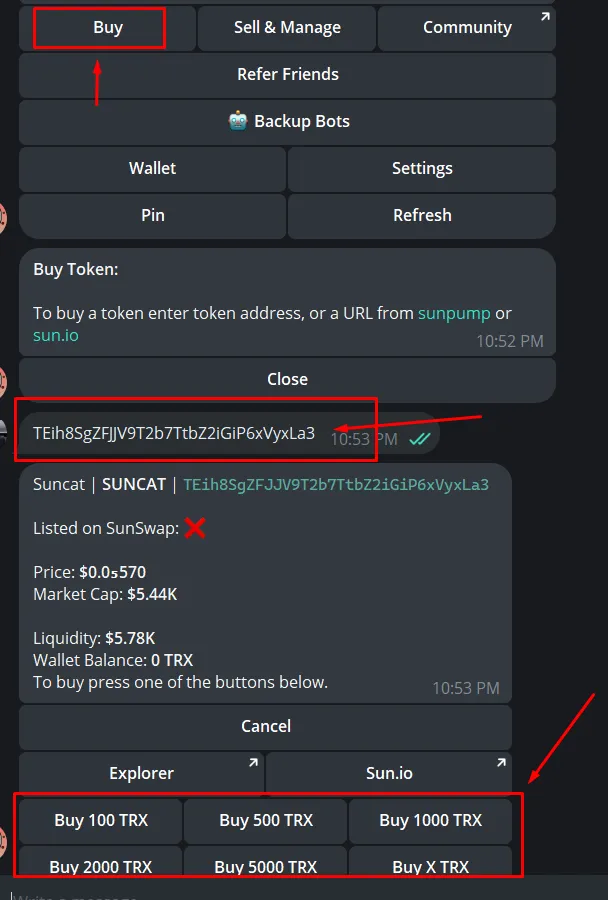
Click on “Backup Bots” if the main bot is too slow.
To sell:
⎆ Type /start in the bot’s chat to return to the main menu
⎆ Click on “Sell and Manage” to view your holdings
⎆ Select the token you wish to sell
⎆ Select the amount to sell & confirm the txn.
To sell:
⎆ Type /start in the bot’s chat to return to the main menu
⎆ Click on “Sell and Manage” to view your holdings
⎆ Select the token you wish to sell
⎆ Select the amount to sell & confirm the txn.
That's it for now.
Everything in this thread is my personal view and is not financial advice.
For more alpha threads, latest airdrops, my trades, charts & calls, industry news & whale wallet tracking:
Join our free TG: t.me
Everything in this thread is my personal view and is not financial advice.
For more alpha threads, latest airdrops, my trades, charts & calls, industry news & whale wallet tracking:
Join our free TG: t.me

I hope you've found this thread helpful.
Follow me @DamiDefi for more.
Like & RT the quote below if you can, it means a lot:
Follow me @DamiDefi for more.
Like & RT the quote below if you can, it means a lot:
جاري تحميل الاقتراحات...