

Everyone says futures trading is for pros only
But did you know you can copy trade these pros for free?
Replicate their strategies with minimal effort
Easiest way to go from $500 to $10,000 as a beginner trader
My ultimate Futures Copy Trading Guide 🧵
But did you know you can copy trade these pros for free?
Replicate their strategies with minimal effort
Easiest way to go from $500 to $10,000 as a beginner trader
My ultimate Futures Copy Trading Guide 🧵

Futures trading can be daunting for a beginner.
Many have lost it all on futures.
However, with this feature, Binance lets you scroll through & choose the best traders on the platform and copy their trades.
You can even copy multiple traders & mock copy-trade.
Many have lost it all on futures.
However, with this feature, Binance lets you scroll through & choose the best traders on the platform and copy their trades.
You can even copy multiple traders & mock copy-trade.
To get started:
⎆ Log in to your Binance account and go to "Trade" - "Copy Trading."
⎆ Select "Futures" on the top tab.
Search for profitable traders by examining their performance over different time frames (e.g., 30-day or 90-day history)
⎆ Log in to your Binance account and go to "Trade" - "Copy Trading."
⎆ Select "Futures" on the top tab.
Search for profitable traders by examining their performance over different time frames (e.g., 30-day or 90-day history)
You can sort and filter portfolios by:
⎆ Timeframes: 7/30/90 days’ performance.
⎆ Lead trader performance metrics: ROI, PNL, Maximum Drawdown (MDD), AUM, Copy Traders, Copy Trader PNL, Sharpe Ratio.
⎆ Timeframes: 7/30/90 days’ performance.
⎆ Lead trader performance metrics: ROI, PNL, Maximum Drawdown (MDD), AUM, Copy Traders, Copy Trader PNL, Sharpe Ratio.
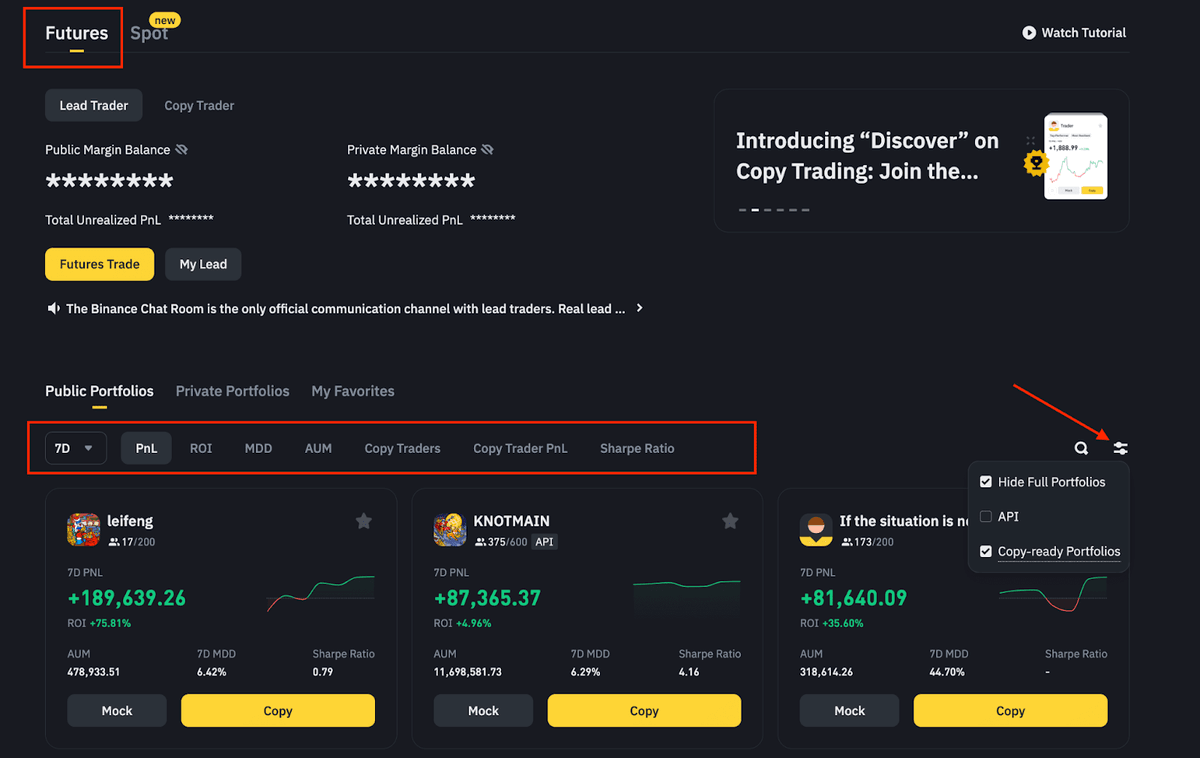
Click on a trader for a detailed view of their activity, including:
⎆ Performance Overview
⎆ Current Positions
⎆ Position History
⎆ Trade History
⎆ Copy Traders
⎆ Performance Overview
⎆ Current Positions
⎆ Position History
⎆ Trade History
⎆ Copy Traders

If you click on "Copy" you have two options: Fixed Amount or Fixed Ratio.
⎆ Fixed Amount: Each order is opened with a fixed margin amount or cost per order.
You can set your trades to open with $50 per trade. Regardless of the trader's amount, your trades will always be $50.
⎆ Fixed Amount: Each order is opened with a fixed margin amount or cost per order.
You can set your trades to open with $50 per trade. Regardless of the trader's amount, your trades will always be $50.
⎆ Fixed Ratio: Your trades will be proportional to the trader's trades based on the ratio of your account size to theirs.
Example: If they have $100,000 in their account and opens a position with 10% of this, you will copy that trade with 10% of your account.
Example: If they have $100,000 in their account and opens a position with 10% of this, you will copy that trade with 10% of your account.
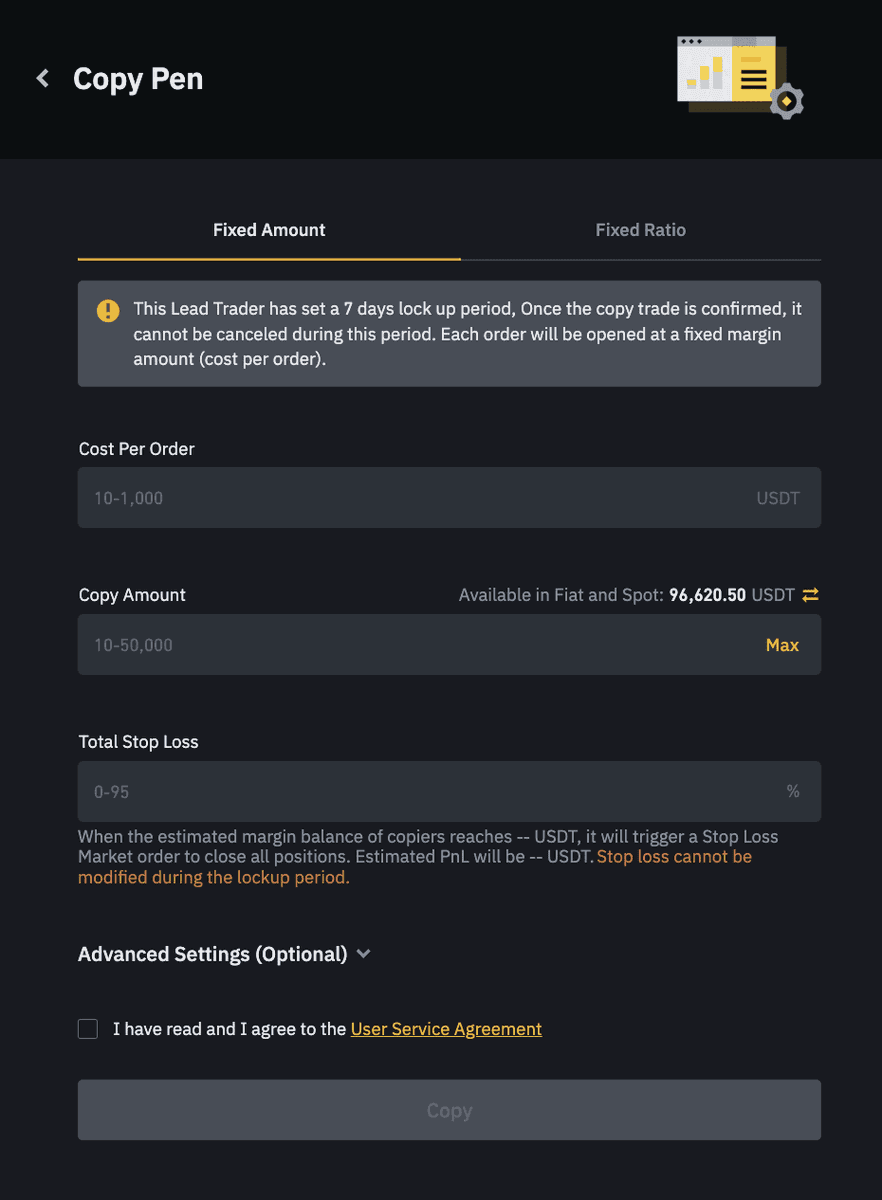
Setting Up Fixed Amount Trading
When the lead trader opens a position, you also open a position in the same direction, but at a flat amount for each trade, let's say $50.
So when setting up the "Cost Per Order" amount will be $50
When the lead trader opens a position, you also open a position in the same direction, but at a flat amount for each trade, let's say $50.
So when setting up the "Cost Per Order" amount will be $50
The "Copy Amount" is the total margin you allocate for copying the trader.
Eg: if he opens 10 trades, each costing you $50, the total amount will be $500.
The amount you enter should be enough to fund all the trades and cover potential losses to keep the trades open (so $500+)
Eg: if he opens 10 trades, each costing you $50, the total amount will be $500.
The amount you enter should be enough to fund all the trades and cover potential losses to keep the trades open (so $500+)
Total Stop Loss
Set a stop loss for your total copy amount.
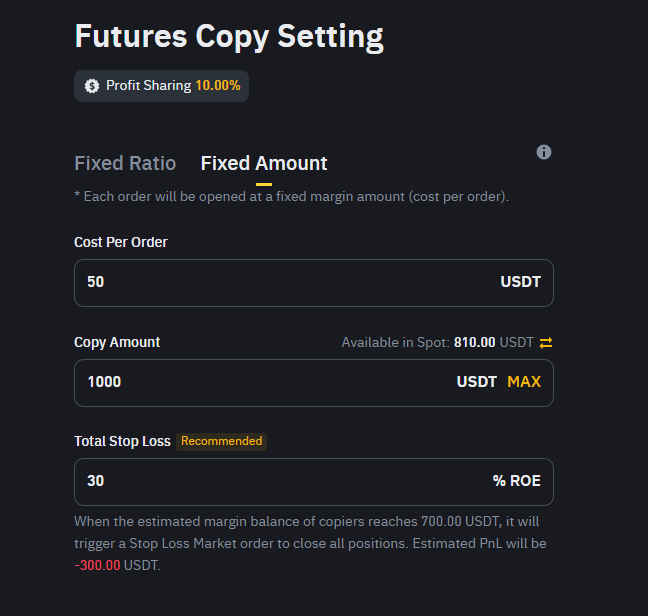
Eg: If your total margin is $1,000, you might set a stop loss at 30%.
If your account drops to $700, trades will start to be stopped out to prevent further losses.
So the entire setup will resemble this image:
Set a stop loss for your total copy amount.
Eg: If your total margin is $1,000, you might set a stop loss at 30%.
If your account drops to $700, trades will start to be stopped out to prevent further losses.
So the entire setup will resemble this image:
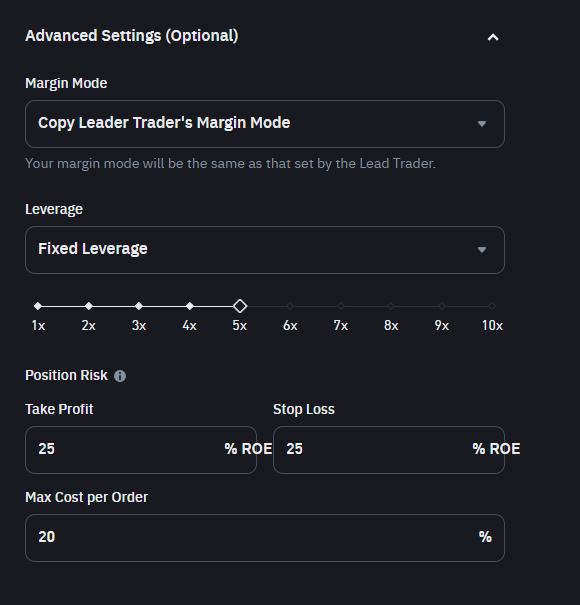
You can also choose to refine your trades with "Advanced Settings"
Margin Mode:
⎆ Copy Leader Trader's Margin Mode: Follow the margin mode used by the trader you are copying.
⎆ Fixed Mode: Set your own margin mode.
Margin Mode:
⎆ Copy Leader Trader's Margin Mode: Follow the margin mode used by the trader you are copying.
⎆ Fixed Mode: Set your own margin mode.
Leverage:
⎆ Copy Leader Trader's Leverage: Use the same leverage as the trader you are copying.
⎆ Fixed Leverage: Choose a comfortable leverage level for yourself. Personally, I do not go higher than 5x.
⎆ Copy Leader Trader's Leverage: Use the same leverage as the trader you are copying.
⎆ Fixed Leverage: Choose a comfortable leverage level for yourself. Personally, I do not go higher than 5x.
Take Profit and Stop Loss: This is TP & SL for individual positions and not the entire portfolio.
This way, if an individual trade reaches a certain profit or loss level, it will automatically close.
This allows you to tweak TP & SL based on individual risk appetite.
This way, if an individual trade reaches a certain profit or loss level, it will automatically close.
This allows you to tweak TP & SL based on individual risk appetite.
Max Cost per Order
It gives you control over your exposure to any single asset.
For instance, if the trader puts 50% of his portfolio into BTC and your Max Cost per Order is 20%, only 20% of your account will be allocated to BTC.
It gives you control over your exposure to any single asset.
For instance, if the trader puts 50% of his portfolio into BTC and your Max Cost per Order is 20%, only 20% of your account will be allocated to BTC.
Everything in this thread is my personal view and is not financial advice.
For more alpha threads, latest airdrops, my trades, charts & calls, industry news & whale wallet tracking:
Join our free TG: t.me
For more alpha threads, latest airdrops, my trades, charts & calls, industry news & whale wallet tracking:
Join our free TG: t.me

I hope you've found this thread helpful.
Follow me @DamiDefi for more.
Like & RT the quote below if you can, it means a lot:
Follow me @DamiDefi for more.
Like & RT the quote below if you can, it means a lot:
جاري تحميل الاقتراحات...