

Say hello to WordPress 6.4! 🎉
Recently released, #WordPress 6.4 marks the third major release of 2023. This version has exciting new features, essential bug fixes, and several updates for smoother #website creation and management.
In this thread, we'll show you what's new with screenshots of the new features!
Please ❤️ and 🔁 to spread the word.
Recently released, #WordPress 6.4 marks the third major release of 2023. This version has exciting new features, essential bug fixes, and several updates for smoother #website creation and management.
In this thread, we'll show you what's new with screenshots of the new features!
Please ❤️ and 🔁 to spread the word.

Twenty Twenty-Four Is The New Default Theme:
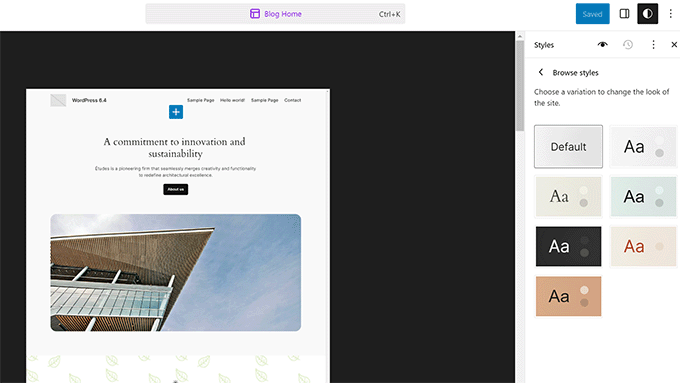
With a minimalist design, this #theme is a powerhouse. It's fully aligned with the Site Editor and offers 6 unique style variations 🖥
Plus, it unlocks a variety of amazing #WordPress block patterns for seamless page and post creation!
With a minimalist design, this #theme is a powerhouse. It's fully aligned with the Site Editor and offers 6 unique style variations 🖥
Plus, it unlocks a variety of amazing #WordPress block patterns for seamless page and post creation!
Improved Pattern Management with Custom Categories:
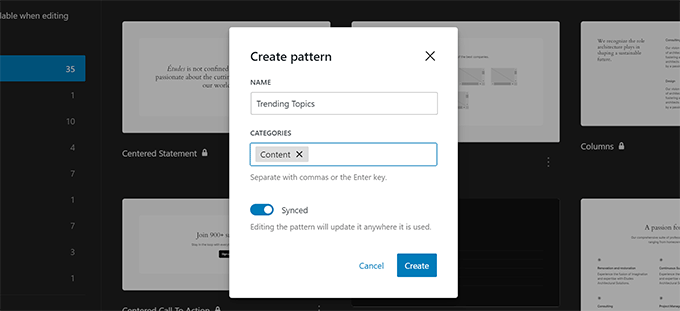
Patterns = groups of blocks ready to be deployed anywhere on your site. With 6.4, it's simpler to manage these #patterns in the site editor 🧩
You can now add custom #categories to your patterns for better organization! Plus, the Pattern creation modal now boasts a consistent look throughout your #WordPress admin area 🖥
Patterns = groups of blocks ready to be deployed anywhere on your site. With 6.4, it's simpler to manage these #patterns in the site editor 🧩
You can now add custom #categories to your patterns for better organization! Plus, the Pattern creation modal now boasts a consistent look throughout your #WordPress admin area 🖥
Attachment Pages Disabled By Default:
In previous versions, #WordPress created separate pages for each media upload, which is not ideal for SEO 🌐
No more relying on #SEO plugins for a fix! For new sites, attachment pages are turned off by default. Do you have an existing site? It stays the same, but you can disable attachment pages easily with this code:
1. update_option( 'wp_attachment_pages_enabled', 0 );
A small change, but a big win for streamlined site management and SEO 🎯
In previous versions, #WordPress created separate pages for each media upload, which is not ideal for SEO 🌐
No more relying on #SEO plugins for a fix! For new sites, attachment pages are turned off by default. Do you have an existing site? It stays the same, but you can disable attachment pages easily with this code:
1. update_option( 'wp_attachment_pages_enabled', 0 );
A small change, but a big win for streamlined site management and SEO 🎯
Display Images in Lightbox #Popup:
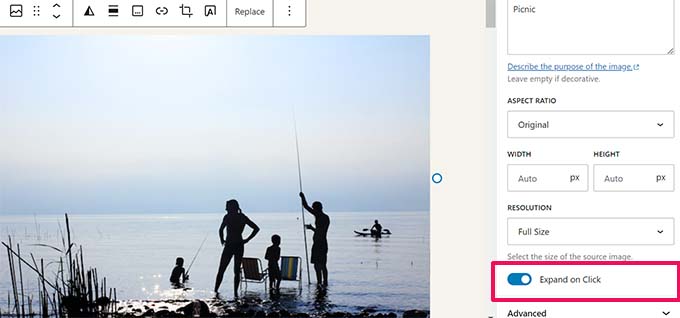
Now, you can easily enable #lightbox popups for images in your posts and pages. Simply toggle the "Expand on Click" option under block settings.
Give your users the freedom to enlarge #images without leaving the page 🌄
While it's in early development, for advanced galleries, you can explore plugins like @enviragallery and NextGen 🖼
Now, you can easily enable #lightbox popups for images in your posts and pages. Simply toggle the "Expand on Click" option under block settings.
Give your users the freedom to enlarge #images without leaving the page 🌄
While it's in early development, for advanced galleries, you can explore plugins like @enviragallery and NextGen 🖼
Block Editor Enhancements:
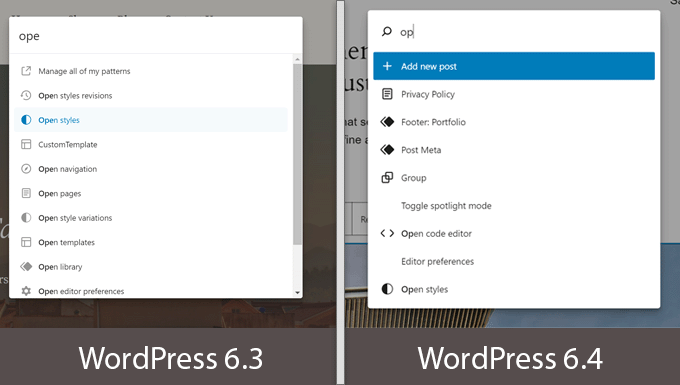
#WordPress 6.4 takes a big step forward in improving the site and #block editor. The groundwork for Gutenberg's phase 3 has begun, emphasizing collaboration.
With several #Gutenberg releases merging into the core, we have new features and enhancements to elevate your editing experience 👨🏽💻
Following are some of the more noticeable enhancements in Block Editor 👇🏽
#WordPress 6.4 takes a big step forward in improving the site and #block editor. The groundwork for Gutenberg's phase 3 has begun, emphasizing collaboration.
With several #Gutenberg releases merging into the core, we have new features and enhancements to elevate your editing experience 👨🏽💻
Following are some of the more noticeable enhancements in Block Editor 👇🏽
Background #Images for Group Block:
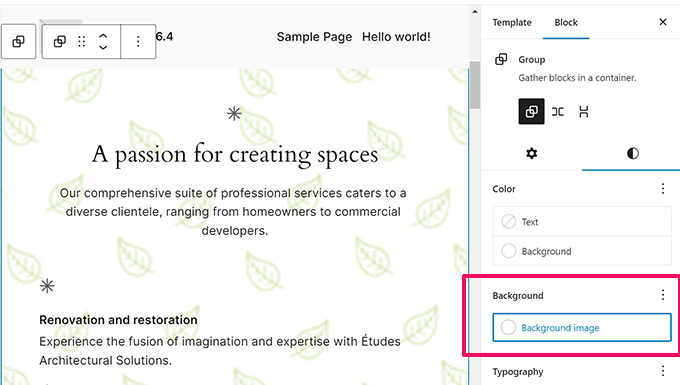
Now you can take your layout design to the next level by setting custom #background images for different sections of your posts and site. The possibilities are endless!
Grouping blocks is the easiest way to create different sections of a #layout in the post or full site editor 🖼️
Now you can take your layout design to the next level by setting custom #background images for different sections of your posts and site. The possibilities are endless!
Grouping blocks is the easiest way to create different sections of a #layout in the post or full site editor 🖼️
Improved Toolbars for Parent/Child Blocks:
Say goodbye to #toolbar shuffling! With #WordPress 6.4, the toolbar now stays put, ensuring a smoother user experience when working with nested blocks 👍🏽
Whether it's Navigation, List, or Quote #blocks, editing just got more efficient 💡
Say goodbye to #toolbar shuffling! With #WordPress 6.4, the toolbar now stays put, ensuring a smoother user experience when working with nested blocks 👍🏽
Whether it's Navigation, List, or Quote #blocks, editing just got more efficient 💡

Revamped Outline/List View:
#WordPress 6.4 enhances the List view for a more intuitive editing experience 📋
✔️ See a quick outline of your page or post layout in site/block editor.
✔️ Rename Group #blocks for clarity and readability.
✔️ Get #image and gallery block previews, saving you time and clicks.
Editing just got smoother and more efficient 💪🏽
#WordPress 6.4 enhances the List view for a more intuitive editing experience 📋
✔️ See a quick outline of your page or post layout in site/block editor.
✔️ Rename Group #blocks for clarity and readability.
✔️ Get #image and gallery block previews, saving you time and clicks.
Editing just got smoother and more efficient 💪🏽

Open in New Tab in Link Preview
Your user experience just got smoother! Now, you can easily open #links in new tabs with a simple checkbox in the link preview modal.
Say goodbye to those extra clicks 🌐
Your user experience just got smoother! Now, you can easily open #links in new tabs with a simple checkbox in the link preview modal.
Say goodbye to those extra clicks 🌐

Block Hooks:
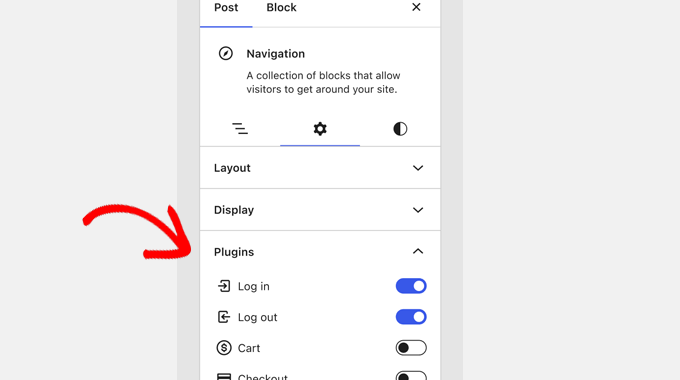
Exciting news for #WordPress developers! WordPress 6.4 introduced Block Hooks, enabling plugins to effortlessly add #blocks upon activation 🧩
With this feature, plugin #developers can seamlessly extend blocks without altering them directly. Imagine a membership #plugin adding a login button to your navigation menu 🚀
Stay in control with the block panel, allowing you to manage and toggle plugins' added blocks on/off!
Exciting news for #WordPress developers! WordPress 6.4 introduced Block Hooks, enabling plugins to effortlessly add #blocks upon activation 🧩
With this feature, plugin #developers can seamlessly extend blocks without altering them directly. Imagine a membership #plugin adding a login button to your navigation menu 🚀
Stay in control with the block panel, allowing you to manage and toggle plugins' added blocks on/off!
جاري تحميل الاقتراحات...