

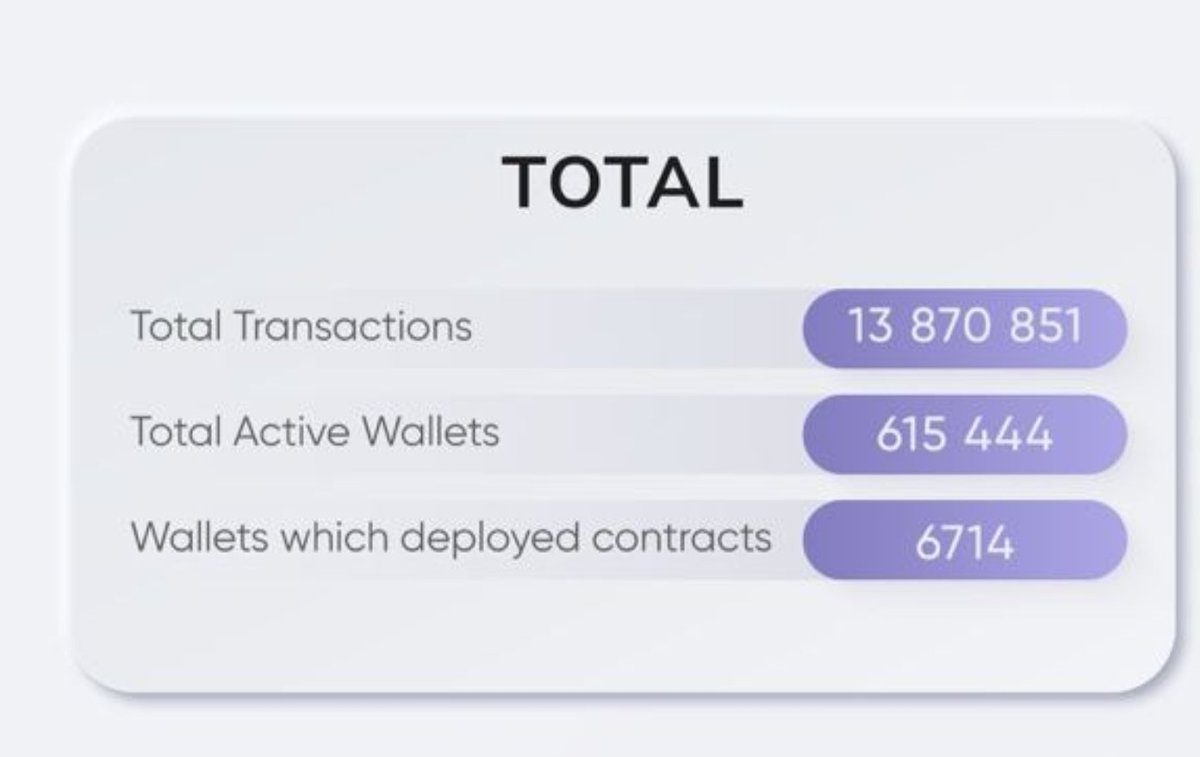
6714 Wallets have deployed contract on @zksync. That's 1% of the Total Active Wallet on the #zkSyncEra BlockChain.
Here is how to deploy a Contract with $1 as Gas Fee 🧵
Here is how to deploy a Contract with $1 as Gas Fee 🧵
I will be going straight to business because you are already familiar with the ecosystem. They promised 2/3 which is 66% of the token to the community.
By my assumptions: Airdrop hunters, DAOs(Mute, SyncSwap etc) and People that deployed contracts might benefit from the airdrop
By my assumptions: Airdrop hunters, DAOs(Mute, SyncSwap etc) and People that deployed contracts might benefit from the airdrop

Deploying a smart contract on the ZkSync Era on Windows
Disclaimer: To deploy a smart contract on the #zkSync network, you will need to provide ur private key to the MM wallet. I recommend you do not use ur main wallet, Create a New wallet and use it just to be on a safer side
Disclaimer: To deploy a smart contract on the #zkSync network, you will need to provide ur private key to the MM wallet. I recommend you do not use ur main wallet, Create a New wallet and use it just to be on a safer side
In this guide, we will be deploying a smart contract on the #zksync_Era Mainnet.
Add the ZkSync Era networks to metamask: chainlist.org
Add the ZkSync Era networks to metamask: chainlist.org
Bridge into Zksync with Orbiter.finance
Download and install on PC:
a) Node.js - nodejs.org (I installed the version on the left, “recommended for everyone”. After installation,you need to restart your PC
b) Visual Studio Code -code.visualstudio.com
Download and install on PC:
a) Node.js - nodejs.org (I installed the version on the left, “recommended for everyone”. After installation,you need to restart your PC
b) Visual Studio Code -code.visualstudio.com

code.visualstudio.com/download
Download Visual Studio Code - Mac, Linux, Windows
Visual Studio Code is free and available on your favorite platform - Linux, macOS, and Windows. Down...
Orbiter.finance
Orbiter-Finance
Orbiter Finance is a decentralized cross-rollup bridge for transferring the Ethereum native assets,...

nodejs.org/en
Node.js
Node.js® is a JavaScript runtime built on Chrome's V8 JavaScript engine.
-Create a folder on the desktop HELLO-ZKSYNC
-Open Visual Studio and open the HELLO-ZKSYNC folder you created by clicking File - Open folder in the upper left corner
-Open Visual Studio and open the HELLO-ZKSYNC folder you created by clicking File - Open folder in the upper left corner

Click on the icon on the top right, as shown in the screenshot, you will open a panel with the Terminal (by default, the path to your HELLO-ZKSYNC folder will be selected)

In the Terminal, Copy and paste these commands individually and click enter:
Twitter won't allow be paste the codes so I entered in a google doc
docs.google.com
Twitter won't allow be paste the codes so I entered in a google doc
docs.google.com

Next, create a file in folder HELLO-ZKSYNC by clicking on the button as in the screenshot and name it hardhat.config.ts

By clicking on it, a field will open where we paste the following text
Get the text in this doc:
docs.google.com
Get the text in this doc:
docs.google.com


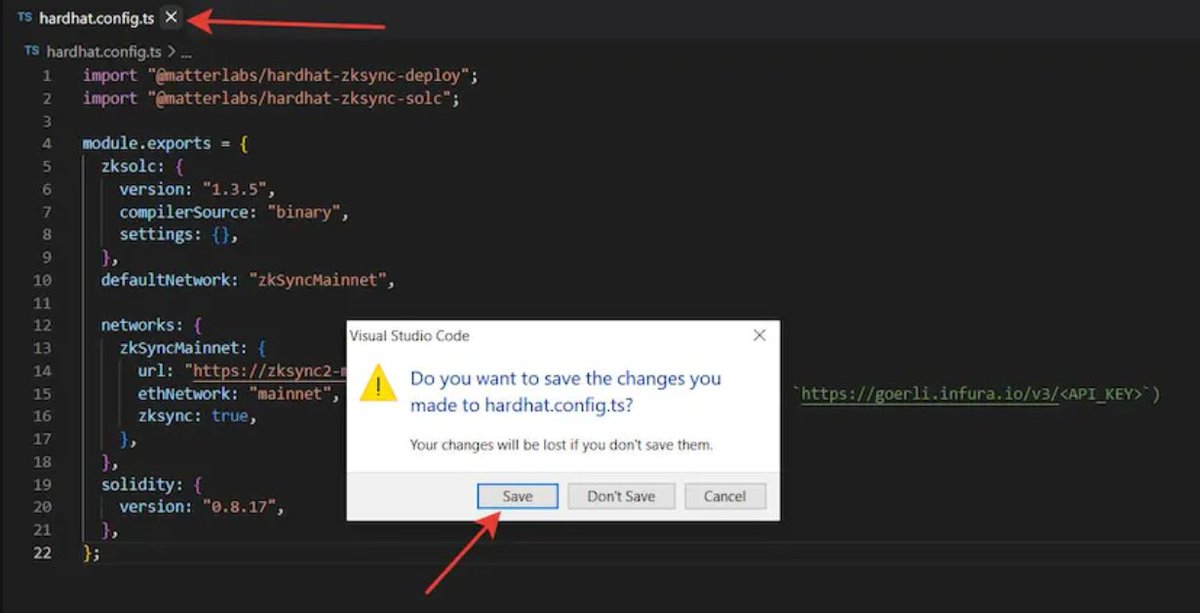
Close the file by clicking on the cross and save your changes!
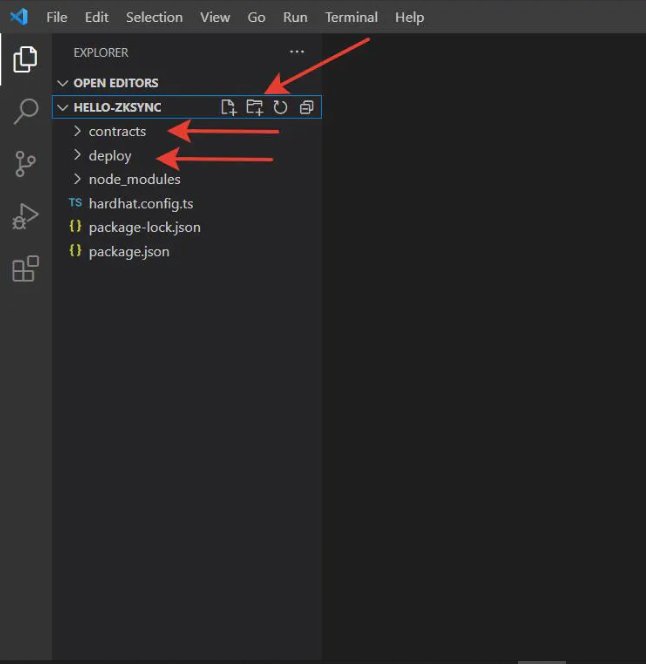
In the left menu in the folder HELLO-ZKSYNC, create folders contracts and deploy by clicking on the button, as in the screenshot
In the folder contracts, create the file Greeter.sol
and paste the following code into it
Get the code here: docs.google.com
Then Close the file by clicking on the cross and save!
and paste the following code into it
Get the code here: docs.google.com
Then Close the file by clicking on the cross and save!


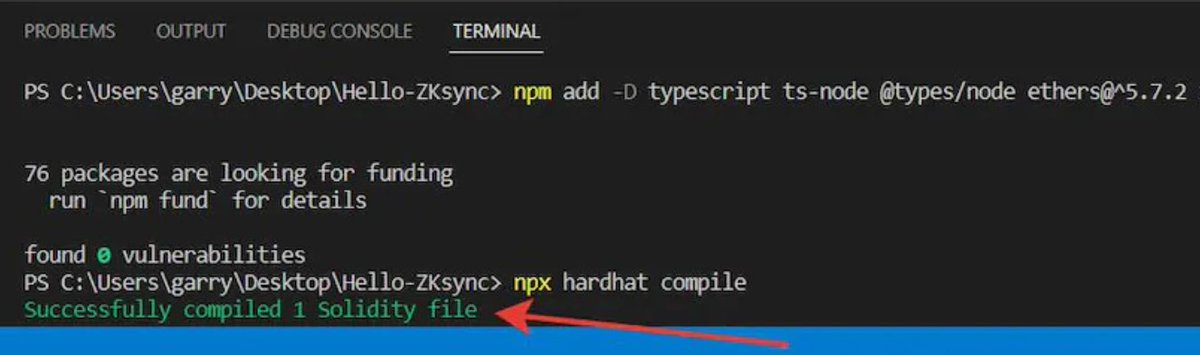
Next, in the Terminal type the command below and press Enter:
npx hardhat compile
npx hardhat compile
If you did everything correctly, you will see the following message:
Select folder deploy we created before, create the deploy.ts file into it
and paste the code into it:
Get the code here: docs.google.com
Close the file and save!
and paste the code into it:
Get the code here: docs.google.com
Close the file and save!

Create a file in folder HELLO-ZKSYNC, let's call it .secret
Paste private key here (USE A NEW WALLET PLEASE)
Close the file and save!
Paste private key here (USE A NEW WALLET PLEASE)
Close the file and save!

Type the last command to deploy the contract:
npx hardhat deploy-zksync
npx hardhat deploy-zksync
If you did everything right, the next notifications will appear

After that, go to explorer.zksync.io and enter our contract address and see that it has been created. You can also enter the address of your metamask and see two transactions, because after the deployment command, there is also an interaction with the contract.

Congratulations, you have deployed a smart contract on the ZKSync Era Mainnet!!!
You can also verify your contract. But after that, it will be available to everyone, which increases the risk of hacking and theft of your private key. As I wrote at the beginning, do all operations only on a test wallet

For this:
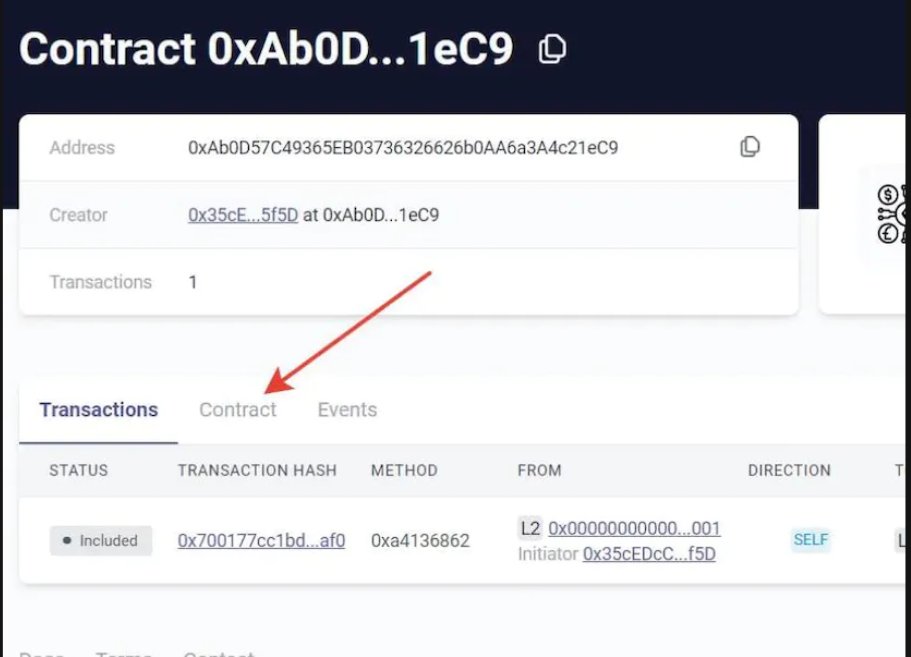
Go to explorer.zksync.io
Enter the address of your smart contract
Next, click on the Contract tab
-Click on the Verify Smart Contract button
-Fill in all the fields as shown in the picture:
Go to explorer.zksync.io
Enter the address of your smart contract
Next, click on the Contract tab
-Click on the Verify Smart Contract button
-Fill in all the fields as shown in the picture:

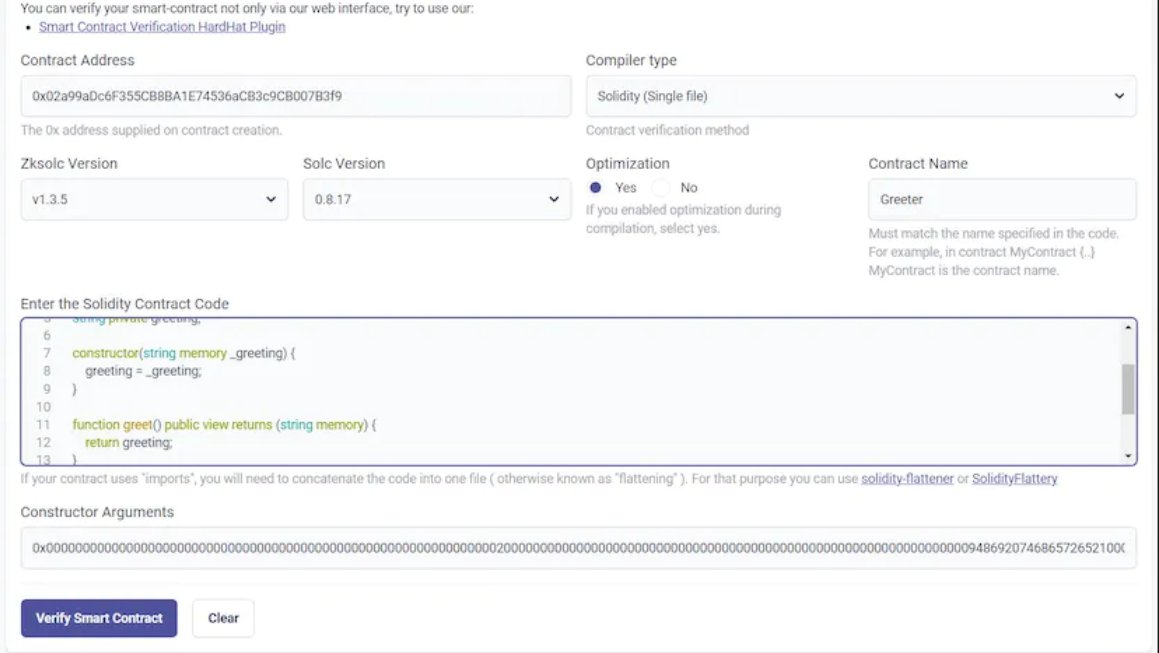

In the Constructor Arguments field, insert the data that appeared after the deployment of the contract

If someone did not have it, it is the same for everyone, you can enter
0x000000000000000000000000000000000000000000000000000000000000002000000000000000000000000000000000000000000000000000000000000000094869207468657265210000000000000000000000000000000000000000000000
0x000000000000000000000000000000000000000000000000000000000000002000000000000000000000000000000000000000000000000000000000000000094869207468657265210000000000000000000000000000000000000000000000
After you have filled in all the fields, click the Verify Smart Contract button

Congratulations, you have verified your smart contract!

Spent $0.6 for all this

Don't forget to Like and RT for Awareness.
Follow me for more of this post too
Follow me for more of this post too
Tagging Defi GigaChads in the Space
@thegreatola
@WisdomMatic
@ThePaulOla
@Smartecio
@NDIDI_GRAM
@0xFastLife
@MingoAirdrop
@o_ponle
@I_am_patrimonio
@OlimpioCrypto
@scylla_98
@ruledout_
@Abrahamchase09
@Okpara081
@mztacat
@Blueofweb3
@thegreatola
@WisdomMatic
@ThePaulOla
@Smartecio
@NDIDI_GRAM
@0xFastLife
@MingoAirdrop
@o_ponle
@I_am_patrimonio
@OlimpioCrypto
@scylla_98
@ruledout_
@Abrahamchase09
@Okpara081
@mztacat
@Blueofweb3
Some great people to follow:
@DeFiMinty
@Chinchillah_
@CryptoShiro_
@TheDeFISaint
@0xTindorr
@wacy_time1
@CryptoKoryo
@rektfencer
@Louround_
@arndxt_xo
@0xsurferboy
@2lambro
@0xSalazar
@Cryptotrissy
@MacnBTC
@DeFiMinty
@Chinchillah_
@CryptoShiro_
@TheDeFISaint
@0xTindorr
@wacy_time1
@CryptoKoryo
@rektfencer
@Louround_
@arndxt_xo
@0xsurferboy
@2lambro
@0xSalazar
@Cryptotrissy
@MacnBTC
جاري تحميل الاقتراحات...